Billings and Payments
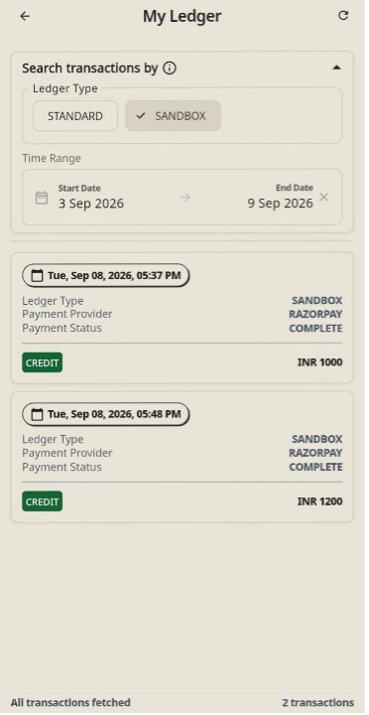
The Billing & Payments section (labelled as My Ledger) provides providers with a detailed transaction history for financial tracking, auditing, and reconciliation across production and sandbox environments.
Navigating to My Ledger
Access financial records from Home or Bottom Bar.
- Via Home Screen: Under Quick Links, tap Billing & Payments.
- Via Bottom Bar: Tap Payments located in the bottom navigation menu.
Searching and Filtering Transactions
Filter transactions by environment and custom date ranges.
- Expand the Search transactions by collapsible filter panel at the top.
- Select Ledger Type:
- STANDARD: Production transactions from real patient bookings.
- SANDBOX: Test transactions processed during platform setup or testing.
- Filter by Time Range:
- Tap the Start Date or End Date field to open the calendar date picker.
- Select the desired start and end dates, then tap Save in the top right corner.
- The list will update automatically to display matching financial records along with total transaction counts.
Note
Our team will share a monthly transaction pdf and settlement will be done monthly basis.