Patient Referal to Sleep Lab
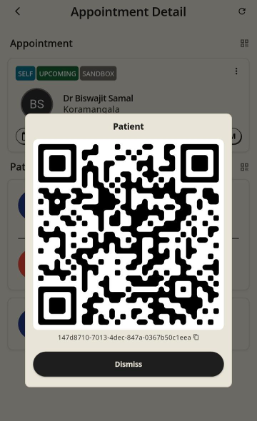
When a Doctor or Physician conducts a consultation and determines that a patient requires a specialized sleep study (e.g., Polysomnography), they can seamlessly refer the patient to a Sleep Lab by sharing the unique booking identifiers or QR credentials generated during the consultation.
Step 1: Recommend Sleep Test in Consultation:
Complete the initial patient assessment and recommendation.
- Conduct the consultation and access the Patient EHR screen.
- Record clinical observations, vitals, and diagnosis.
- Under the Advice or Investigations Ordered section of the EHR, explicitly note the recommended Sleep Test (e.g., Level 1 / Level 2 Sleep Study).
- Save and Submit the consultation record.
Step 2: Extract Patient Identifiers:
Locate Consultation Id or QR code.
- Retrieve the unique identifiers required for Sleep Lab intake:
- Patient ID and Consultation ID (tap to copy text), OR
- Patient QR Code / Appointment QR Code on the patient's record.
Step 3: Share Identifiers with Sleep Lab
Pass credentials to the target Sleep Lab facility.
- Share the copied Patient ID / Appointment ID or export the QR Code image directly to the designated Sleep Lab service provider.
- The Sleep Lab technician can now navigate to Patient Records > EHR Search on their Sleepfore app, scan the QR code (or enter the IDs under Query Options), and instantly load the patient's shared medical history and sleep test recommendations to initiate lab booking.