Business Account Approval
After submitting your Business Account registration, your profile will be reviewed and approved by the Sleepfore Admin Team. All submitted documents will be carefully reviewed by our authorised personnel. If any additional information or documents are required, the Service Provider will be notified accordingly.
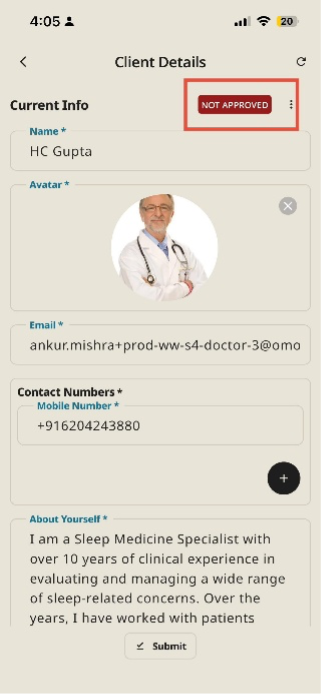
Note: Your profile status will display as "NOT APPROVED" until our Sleepfore’s Team verifies and approves the same.
Steps
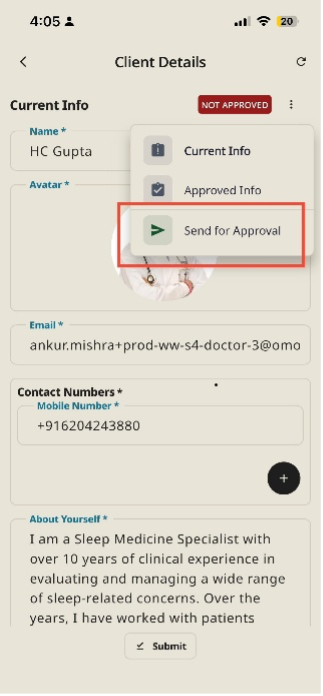
- From the Client Profile Section, Click on the three vertical dots
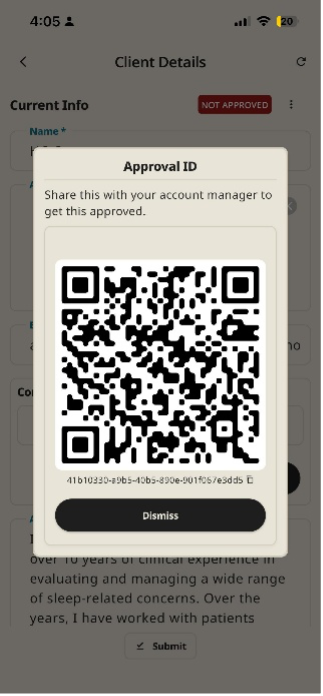
- Select ‘Send for Approval’ to generate the QR code.
- Once the QR code is generated, share it with the designated contact person (such as the Account Manager/Operations Manager, or to the official email ID provided during onboarding.)
Key Details for Business Approval
- Review Process: The Sleepfore administrative team verifies your credentials, documents shared, and registered health center details to maintain platform compliance and data safety.
- Notification: Once verified, you will receive confirmation email at your registered email address, and your status will automatically update to Approved / Verified
- Support Escalation: If your approval takes longer than 24–48 hours, navigate to Hamburger Menu (≡) > Contact Us to raise a support ticket.